

Cross the coastal fringe and head inland, and mobile bars start disappearing fast. For caravanners and motorhome travellers planning a run through the Red Centre, the Kimberley or the Channel Country, the question of how to stay connected while travelling Australia is not just about convenience; out there, communication is safety. Yet most guides treat it as a single-gadget problem, which is exactly why so many travellers end up with a setup that half-works.
This guide takes a different approach. It treats Outback communication as a layered system, explains honestly what each tool can and cannot do, and shows where a caravan satellite dish becomes the most dependable piece of the puzzle for both TV and broadband. By the end, you will be able to design a setup that suits your trip, your budget and your van, with a clear next step when you are ready to choose hardware.
Why Outback Australia breaks normal phone and internet expectations
Australian mobile networks are built around where people live, not around how much land there is. The network with the broadest regional reach covers roughly 99 per cent of the population, but that still leaves enormous stretches of the interior with no signal at all. Drive a few hundred kilometres off the main highways in parts of Western Australia, the Northern Territory or outback Queensland and you will find dead zones that stretch for hundreds of kilometres, regardless of which SIM card is in your pocket.
Terrain and weather compound the problem. Ranges, deep gorges, dense mulga and even heavy dust storms can weaken or block both mobile and satellite signals, and a storm cell sitting over your camp can knock out a connection that was working perfectly an hour earlier. This is not a network failure; it is the physical reality of communicating across one of the largest, most sparsely populated land masses on Earth.
The practical takeaway is this: you will not have constant reception on an Outback trip, so stop planning as if you will. Plan around periods of no service instead. Decide in advance where your check-in points will be, what you will download before you leave coverage, and which tools will still function when one layer fails. That shift in thinking, from expecting connectivity to managing it deliberately, is the foundation of a reliable remote setup.
Build a layered Outback communication setup, not a single gadget
The travellers who cope best with remote Australia’s patchy coverage are the ones who stop looking for one device that does everything and start combining several tools, each covering a different failure mode. Think of it as layers, where each one backs up the one above it.
The planning layer happens before you leave town. Download offline maps and navigation apps to your phone or tablet, cache weather forecasts, save road condition updates and park alerts, and pull any documents you might need onto your devices. Streaming content, podcasts and audiobooks should also be loaded while you have good Wi-Fi, because mobile data in the Outback will rarely support them reliably.
The routine contact layer keeps people at home informed. Agree simple check-in habits with a trusted contact: a text or call from each major town, a location share when you have data, or a short message via a satellite communicator where appropriate. Both sides need to agree, before you leave, on what happens if a check-in is missed.
The navigation and information layer replaces the assumption that online maps will work. Use offline GPS apps or a dedicated sat-nav loaded with topographic maps, carry paper maps as a fallback, and save waypoints for fuel stops, water sources and emergency exits well in advance.
The entertainment and comfort layer is where many travellers hit a wall. Pre-loading music, shows and podcasts helps, but on a long trip it runs out. Streaming via mobile data simply will not work once you are genuinely remote, which is where satellite-based options fill the gap.
Finally, the emergency and redundancy layer sits underneath everything else. These are the tools, covered in the last section, that still function if mobile coverage never appears. They are not optional.
Core options for calls and internet on the road: honest pros and cons
Standard mobile coverage is still the default starting point for most travellers, and it remains genuinely useful on major highways and in towns. Before you go, check the coverage map for whichever network you are on; the one with the broadest rural reach covers about 99 per cent of the population, which sounds impressive until you realise that the 1 per cent it misses includes vast areas of the Outback. For travel beyond the highway network, even the best SIM will eventually show no signal.
For caravanners and motorhome travellers in fringe areas, a phone paired with a high-gain external antenna or a legal signal booster can meaningfully stretch coverage. These antennas pull in a weaker signal more efficiently, which can be the difference between a call connecting and dropping out on the edge of a town’s footprint. Where there is no tower within range at all, however, they offer nothing.
Public Wi-Fi at roadhouses, libraries, caravan parks and cafes is genuinely useful for bulk tasks: downloading app updates, backing up photos, sending large emails and syncing cloud storage. Speeds and data limits vary widely, but even a slow connection at a remote roadhouse is worth stopping for if you have a long offline stretch ahead.
Satellite-based internet services provide high-speed data almost anywhere with a clear view of the sky. They suit travellers who need to work remotely, families who want reliable streaming, or anyone planning extended stays in locations with no mobile coverage. The trade-offs are real: these systems require more power, a dedicated mounting solution and an ongoing subscription. For travellers who only need occasional email they are likely overkill, but for full-time travellers doing a big lap they are often transformative.
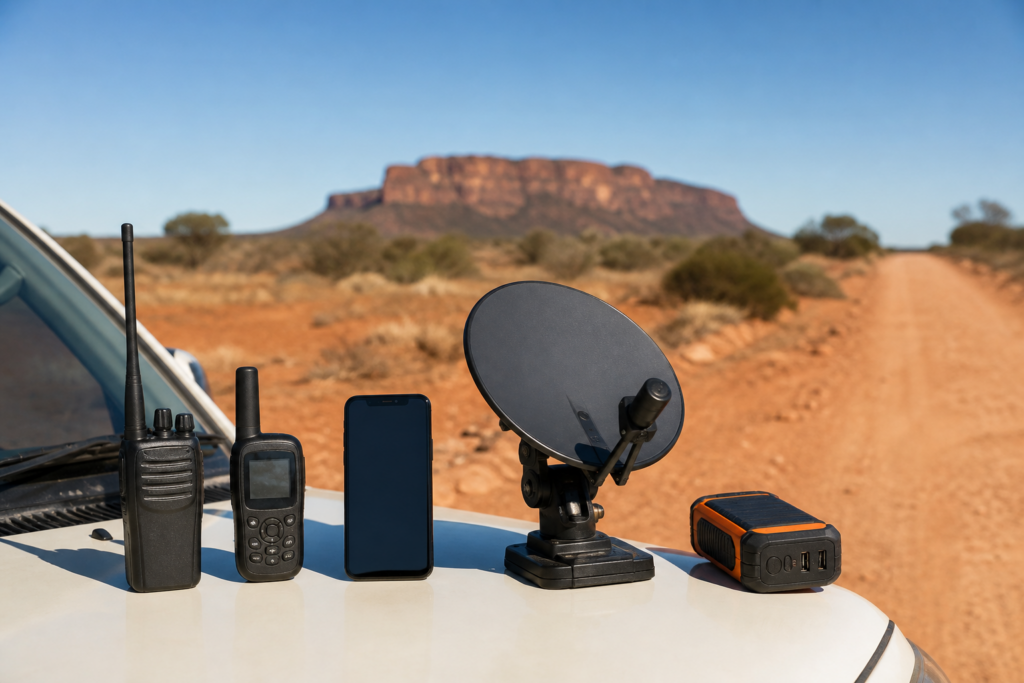
Satellite phones allow voice calls and SMS from virtually anywhere on the continent. They are expensive to purchase or hire and call costs add up, but for solo travellers or those pushing into very remote country they provide genuine reassurance. Compact two-way satellite messengers are a more affordable middle ground: text-only, with subscription plans that suit occasional remote trips and SOS functionality that notifies emergency services with your GPS coordinates. Many experienced remote travellers carry both a messenger for day-to-day check-ins and a PLB (Personal Locator Beacon) as a separate, subscription-free emergency device.
None of these tools is perfect in isolation. Mobile is fast and cheap where it works but useless beyond the towers. Satellite services are reliable but demand power and cost money. Offline tools and messengers fill the gaps in between. A realistic setup combines at least two or three of these layers.
Core options for calls and internet on the road: honest pros and cons
TV, entertainment and why caravan satellite dishes shine off-grid
Terrestrial television relies on transmitters positioned near population centres, so once you drive beyond the footprint of a town’s transmitter, or terrain puts a ridge between you and the signal, the picture breaks up and disappears. In many classic Outback camps there is simply no usable over-the-air signal, and that is not a matter of better aerials; you are just too far from the nearest transmitter.
A satellite TV dish solves this by looking past the landscape entirely. It locks onto a television satellite in geostationary orbit above Australia, so as long as it has a clear view of the sky in the right direction, you receive the same national and regional channels you would at home, independent of mobile coverage or terrain. The signal does not care whether you are camped near a roadhouse outside Longreach or a remote gorge in the Pilbara.
There is a safety dimension to this that is easy to underestimate. Live satellite TV gives you timely weather warnings, bushfire alerts and emergency broadcasts. Pre-downloaded content, no matter how much of it you have, cannot tell you that a fire is developing in your direction or that a flood watch has been issued for the region you are about to drive into. On long trips, access to live news and weather is a meaningful safety tool, not just a comfort.
Comfort matters too, particularly on weather-bound days or extended trips with children. When the rain sets in and you cannot get outside, reliable television and radio make a week-long trip feel sustainable rather than claustrophobic.
For caravan and motorhome travellers, satellite TV dishes come in two broad types. Manual portable dishes mount on a tripod and need to be aimed by hand each time you set up camp. They are lighter, cheaper and flexible about placement, so you can position them away from a shading tree or an awkward angle; the trade-off is the setup time, which becomes straightforward with practice but does need doing every time. Automatic roof-mount systems fold flat for travel and self-locate the satellite at the touch of a button, which is faster and easier, particularly after a long driving day. They cost more and add some height and weight to the roof of the van, but they stay with you permanently and need no stowage space.
Power requirements are modest and well within reach of a standard caravan setup. The typical workflow is: park with a reasonable sky view to the north, deploy the dish, power up the receiver or control box, and let the system locate the satellite. Most systems run comfortably from 12V with an appropriate inverter, so budgeting them into your power planning alongside the fridge, lighting and phone charging is straightforward.
Once you have decided whether a manual or automatic, roof-mount or portable setup suits your style of travel and budget, understanding caravan satellite dishes and how to install them is the practical next step. It walks through specific caravan-ready kits, compatibility considerations for different van types, and what a safe, tidy installation looks like.
Before you leave: safety habits and a simple pre-departure comms checklist
The most important communication tool in remote Australia is one that works without any network at all. A PLB (Personal Locator Beacon) registered with the Australian Maritime Safety Authority (AMSA) sends a distress signal via the international COSPAS-SARSAT satellite network the moment it is activated, pinpointing your location for search and rescue. Registration is free, there is no subscription, and the battery lasts 24 hours of continuous transmission. Carry one; it is not negotiable. A UHF CB radio complements it for short-range communication with nearby travellers, road trains and other vehicles, using Channel 40 on the main highways and agreeing a shared channel with your travel companions before you depart.
Tell someone your plan before you go. Give a trusted contact your rough route, key overnight stops and expected check-in times, and agree explicitly on what they should do if they have not heard from you by a set time. This costs nothing, and it is the single habit that most improves your safety margin in a genuine emergency.
Device readiness is the final piece. Before you leave the last town with reliable coverage, run through this checklist:
1. Charge all phones, satellite gear, the TV receiver or control box, and any satellite messengers fully.
2. Update offline maps, navigation apps and firmware for all devices.
3. Check that spare charging cables, 12V sockets, fuses and inverters are all functional.
4. Confirm your battery and solar setup can run essential comms loads, including the satellite dish equipment, without drawing down critical loads like the fridge.
5. Make a test UHF call, check your PLB indicator lights are healthy, and if you have satellite internet or TV, run through a full setup and shut-down sequence close to home so the process feels routine rather than experimental.
Write the checklist on a card inside the van or in your trip folder. Staying connected while travelling Australia’s remote regions is not something that happens by accident; it happens because you treated communication as a system, planned for the gaps, and made sure every piece of gear was ready before the last mobile bar dropped away behind you.